
Recording Payments
Use Record Payment for money the Club has already received outside ClubPayee, such as cash or a bank transfer.
Record a Payment
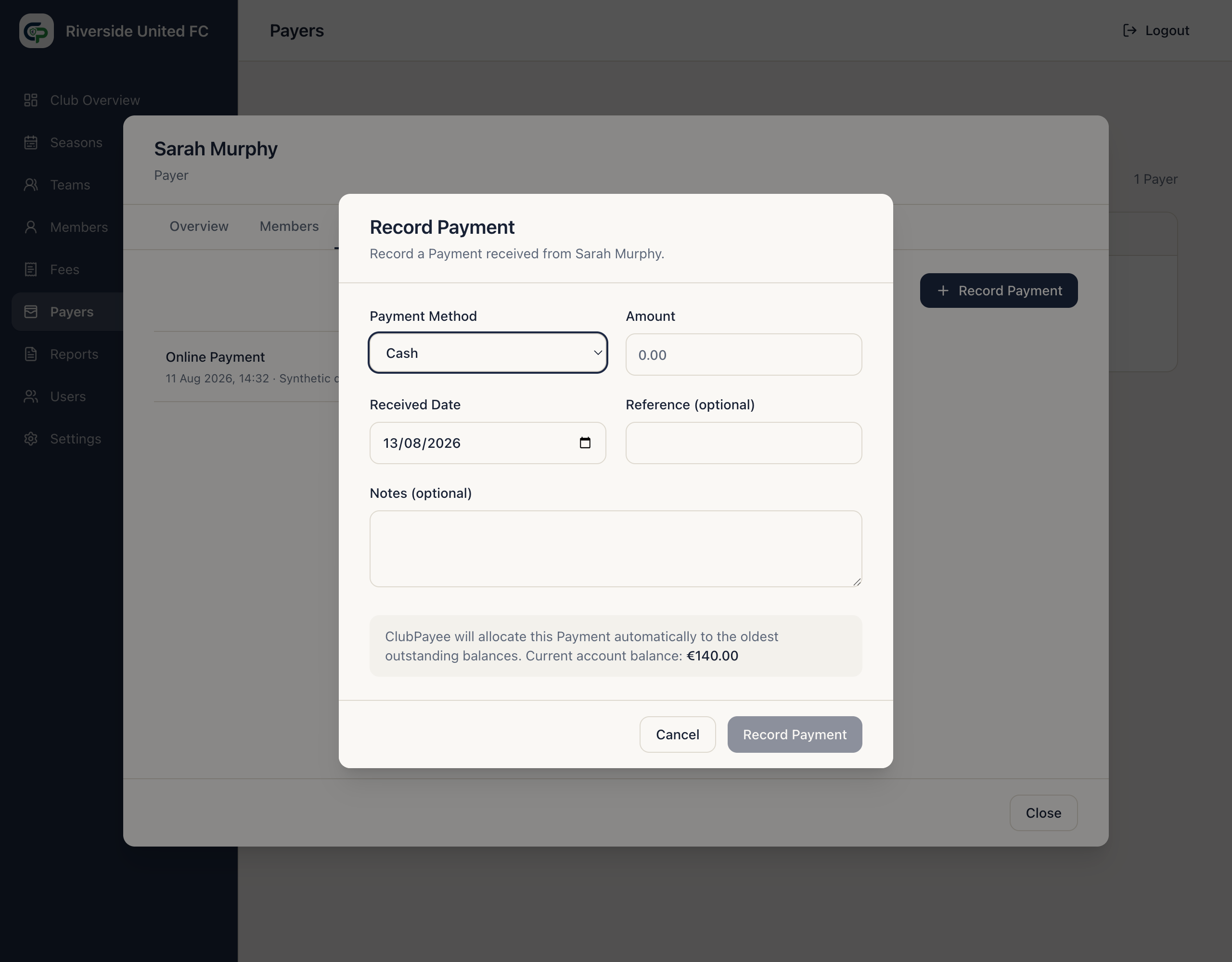
Section titled “Record a Payment”- Open Payers and select the Payer.
- Open Payments.
- Select Record Payment.
- Enter the amount.
- Choose Cash, Bank Transfer, Revolut, Card Reader, or Other.
- Set the Received Date.
- Add an optional Reference and Notes.
- Select Record Payment.
ClubPayee allocates the Payment automatically, starting with the oldest outstanding Season and then the relevant Member charges. The Administrator does not manually split it.
Manual Payment rules
Section titled “Manual Payment rules”Any positive manual Payment can be recorded. If the Club received more than was outstanding, unused value remains on the Payer account as Account Credit and is applied automatically to future charges.
The €5 minimum for partial Online Payments does not apply to manually recorded Payments.
Open the recorded Payment to review its amount, method, date, reference, allocation, and any Refunds.